Last Updated: 11/30/2025 ( First Posted 2003 )
The following information is based on my experience as a FileMaker developer, FileMaker's TechInfo Knowledge Base, and on numerous discussions with FileMaker Tech Support, and FileMaker's Engineers.
I strongly recommend the product. It just needs better utilities !
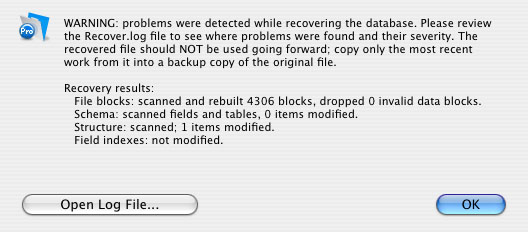
The WARNING
Let me start out by saying that since FileMaker 10, Recover's closing "WARNING" is a bit misleading, and very unsettling.
It reminds you to check the log for "problems", and their "severity", and that the Recovered file should NOT be used going forward.
However, It should go on to say that "Problem" objects can often be edited, or deleted, in the Original file going forward ( or ignored, if of "low severity" ), and that Recover can actually repair certain problems, going forward
The "Hidden" Corruption Problem
FileMaker Pro, and FileMaker Server will open and run files that are corrupt. I have seen this happen multiple times:
- a file that crashes only when two guests are on the same list layout, and a script is triggered to set a number field. This file ran for a full year before the corruption was discovered ( All the backups were corrupt )
- a file that runs fine, until you save as clone, and you find that three layouts are missing in the clone copy. This file did not crash. It was damaged when it was copied to an IMac with a faulty hard drive. This file ran for a week before the corruption was discovered.
- a file with an annoying pause after any user action. This file is much too large to rebuild.
- a file with over 190,000 records, that suddenly displays "Records: 0", and appears blank, even though these records are still visible, and in use, in a related portal.
I understand that files can be corrupted by power surges, and by bad hard drives, and can NOT be prevented. What I don't understand is why FileMaker can not detect it. There is no validation utility ( FileMaker's Customer Support Services explained that since validation can never be 100% accurate, no utility is provided ).
When damaged files run, backups and "master" clones are useless. It is difficult to develop an effective backup strategy, when there is no way to be sure that the files you are backing up are OK ( see FileMaker 9 and FileMaker 10 improvements below ).
This problem was actually documented in FileMaker Answer ID 2943 "Strategies for Protecting Files Whose Structures are as Important as Their Data" "... Any time you make changes to your file's structure ... you will need to save a new master clone. Place your new master clone in a safe place... At this point, you have a clone with no records, but you may also have a file structure that is possibly damaged due to corruption carried over from the original file ..."
This problem was also noted in "FileMaker Server Best Practices" ( Rev 03-2003 p.13 ) "Any system failure causing FileMaker Server to shutdown inappropriately could result in corrupted files ... Even if the files seem to re-open but have to go through a consistency check or recovery, some corruption could be buried in the file"
What are your chances of getting "hidden" corruption? The four failures above are the result of five different organizations, each running an average of 24 files, for 5 years, using FileMaker's best practices.
Editorial Notes
- Most Links to Answer ID's referenced in this document are ( unfortunately ) no longer available
- It appears Claris / FileMaker, as an Organization, is still not quite sure what "Recover" can do.
While FileMaker "Help", and Tech Support ( e.g. "TSGal" ) may advise using Recover to fix specific problems, FileMaker's "Customer Liaison" for damaged files might say that Recover should not be used.
Common Causes of Corruption
- FileMaker Files are stored in 4K blocks. A "pointer" between blocks may get scrambled
- The internal ID of an object, or the catalog of objects in FileMaker may get scrambled
- An index is not properly updated
- An individual bit is flipped, anywhere in the file
- damage that occurs to an image pasted on a layout, or damage that occurs to printer instructions stored in a "print setup" script step. According to FileMaker's Customer Support Services "these are not verified by FileMaker's utilities".
Removing Hidden Corruption
- FileMaker's File Recovery Service will attempt to restore both data and structure ( Answer ID 1633 ), but there are no guarantees. They can now help with damaged access privileges
- Upgrading to a new FileMaker file format may help. I was able to "repair" one of my hidden corruption files, by upgrading an entire solution from FileMaker 4 to 5. Therefore, upgrading is worth a try.
The FileMaker 8 Tech Brief "Migration Foundations" claims that "FileMaker does a very good job of converting databases, even those with some structural corruption.
The resultant FileMaker files should be corruption free however as with most issues of file corruption, the conversion engine may not satisfactorily convert unhealthy files".
Note: It is not clear if this is still true for fmp12 files. There is no fmp12 migration document
- FileMaker folklore is filled with "sure-fire" methods for dealing with corruption, e.g. "export data to a text file, import back into a recovered clone, then save a compressed copy". These methods apply ( often repeatedly ) recover, save as clone, and save as compressed in various combinations, and may, or may not, work
FileMaker offers a version of this approach in Answer ID: 7336 "Ensuring that all of your hosted files are clean of corruption", although it "ensures" nothing, and is misleading - FileMaker's "official" method to recover and rebuild files is described in Answer ID 1580 "How To Organize The Recovery Process When Recovering Related Databases" [link]. If your files are not stable, this is always worth a try. It will clean up your data and structure, just keep in mind that it may not remove the corruption, and may instead remove unexpected portions of your files. Also, for the export data step, you can use a "merge" file, as explained below. It's easier.
- Run Recover ( FileMaker 10 and higher ), review the Recover Log, and use it as a Validation Tool to help identify any "Problem" objects ( e.g. search the Log for "changed" items, or any "difference" other than zero, such as "Difference from old index is ..." ). You can then try editing or deleting those objects in the original file, run Recover again, and check if the "Problems" are gone. It probably pays to "Rebuild field indexes", since that may be the problem ( The Recover Log will show any index "Difference" ).
Recover can also repair certain problems ( see below )
Note: If you run Recover more than once, the results appear in the same Log, concatenated, which can be confusing. Delete, or re-name any existing Recover Log before you start
Removing Obvious Corruption
Corrupt Data
- Export your text, number, date, and time fields to a "merge" ( text ) file, then import back into a clone, using "matching field names". Be sure to check that any repeating fields import properly. No need to export calculation, or summary fields. Container fields must be restored separately.
- For FileMaker 6, check the text export for "illegal" ASCII characters per Answer ID 949
- FileMaker 7 and higher supports UTF-8, so there are no "illegal" characters. However, people have reported problems, when text is pasted or imported from other applications. This is unconfirmed.
Note: If you need to use XML, there are restricted characters
Corrupt Records
- If FileMaker crashes during data export, or while browsing, there may be a corrupt record. See FileMaker Answer ID 4666 "Removing Corrupt Records From a File"
- If a layout object is damaged, it may be difficult to open that layout in order to delete it. See FileMaker Answer ID 4704 "Deleting a Damaged Layout"
Terms
- Unfortunately, since they are stored together, FileMaker uses the terms "data" and "structure" interchangeably, which can be confusing e.g. "The underlying action of Consistency check and Recover is to preserve as much of the data as possible. In this context, data refers to tables, records, layouts, scripts, and field definitions".
For this article, I use "structure" to mean everything left in a clone, and "data" to mean everything removed in a clone.
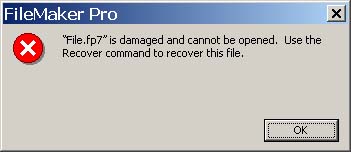
The Recover Utility
- "Recover" was best described in Answer ID 2944 "Tips on Backup and File Recovery": "The primary goal of the Recover command is to retrieve the good parts of the file, resulting in a good working file. Corrupted portions of the file are often eliminated from the recovered file, not fixed. If the recovered file is missing significant portions of your database, one option is to send the database to FileMaker to attempt a more complete recovery of the file"
..... and in Answer ID 4426 "Corrupt / Damaged Files" "Because the recovery process removes structures that may harbor corruption, you may not want to use recovery for routine maintenance" - Hundreds of Tech Talk posts start out by saying "I ran Recover, and my file still has problems". Yes. Of Course. Recover's power is limited
- The myth that Recover "repairs" damage goes back to FileMaker 2.0. FileMaker 2.0 "Help" did state that recover "creates a repaired copy of a damaged file"
- FileMaker endorsed this "Myth of Recover" in Answer ID 2943 ( FileMaker 5 ) "Strategies for Protecting Files Whose Structures are as Important as Their Data" by saying that a master clone can be "possibly damaged due to corruption carried over from the original file. This clone needs to be recovered".
This is wrong, and misleading. Recover is ( unfortunately ) not intended for routine file maintenance. - Now that Recover has become a multi-purpose tool in FileMaker 10, it probably should be called "File Maintenance / Recover".
- A long lost, and very interesting description of the FileMaker 2.0 Recovery process is reproduced here [link] , from Article 102516 "What Happens During Recovery?" (No longer in the TechInfo Knowledge Base).
It is quite possible that Recover was originally intended to be a validation utility. Sort of a Validation / Repair Tool for Poets, that would not trouble you with details. Too bad Recover could never properly report what it found ( much improved in FileMaker 10 ). - To be fair, Recover does re-index fields, re-index file blocks, and re-catalog objects, so in this respect it does actually repair certain problems ( more below )
- As reported at DevCon 2006, FileMaker 8.5 Recover has a new clean-up step, that detects "stranded" ( no longer referenced ) library data ( often images ), and creates a new table, with one container field, and records that point to the stranded data. FileMaker's Clay Maeckel explained that the appearance of this "Recovered Library" or "Recovered Blob", by itself, is not an indication of corruption, since Library data can get "stranded", even in a "healthy" file, and is now cleaned up ( sort of like removing left-over DLL's in Windows )
NOTE: Libraries contain the items stored in container fields such as graphics, or Word documents. There is also a Library that contains any graphics stored on the layouts ( and some that may no longer be in use ) - Recover's closing dialog is not ( and never was ) useful, or reliable. It may, or may not report the fact that bytes have been changed, modified, or removed.
Even if Recover reports 0 item(s) modified, you MUST check the entire log, to see what actually happened.
I reported this as a "bug" ( back in FM 14 ), and FileMaker's TSGal explained that the closing dialog will only report changes that affect your data, even though structure may have been modified. This is wrong, and misleading
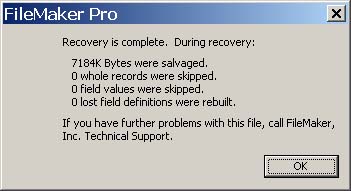
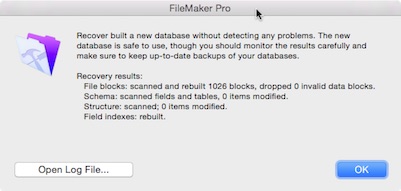
- The sad part is, a Recovered file may be OK. You're just not sure. This was confirmed at DevCon 2008. Most files are Recovered needlessly. Ideally, a "good" file Recovered should end up better, since it is completely rebuilt.
The key word is "required". Avoid using a file that required recovery. - At the DevCon 2008 closing Q&A Session, FileMaker explained that they are looking at ways to make Recover a more useful utility
- Alexei Folger's FileMaker Webinar is available here: File Maintenance and Recovery: New Tools and Best Practices
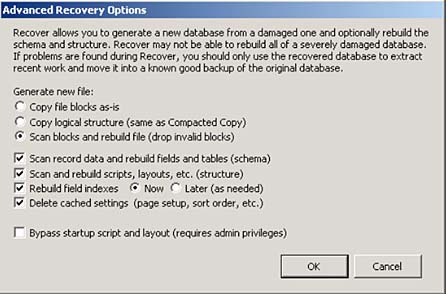
- Important: The "new" Recover options are described in: Setting advanced file recovery options ( Formerly Answer ID 7026 ). You can now decide if Recover should drop invalid blocks or not ( radio buttons ), then decide what it should rebuild ( check boxes ). These are two different steps. This is a huge improvement.
e.g. use "Copy file blocks as-is" to help prevent Recover from removing unexpected portions of your files
How does SQL handle Corruption ?
- A "SQL" database maintains a Transaction Log, which is a history of every change. To restore a corrupt file, you rebuild the last backup, then apply the Transaction Log, to bring it up to date. The resulting file is completely new
- A Transaction Log in FileMaker would be a bit more complex, since changes would include the entire solution, e.g. scripts, and layouts
Index Problems, "Phantom" Blank Records, and Question Marks in all fields
- If an index is scrambled, or contains "extra" entries, FileMaker may "find" a record that does not exist, and display all question marks. The "record" can't be deleted, since it is not real. Just re-index the field in question ( below )
- Fields can be forced to re-index, by turning each index off, then performing a find.
- If you use FileMaker as a SQL Datasource, you can use DROP and CREATE Index to reset fields
- Importing into a Clone will re-build all the indexes
- To repair ( re-index ) with Recover use "Copy file blocks as-is", then select "Rebuild field indexes". Note: Any "difference" between the old and new index will be shown in the Log, and considered a "problem" if other than zero
- Various index & phantom record problems have been around since FileMaker 7. Some are documented, and have been "fixed". I have seen phantom records twice in FileMaker 9v3, but not yet in FileMaker 11
- If you "Show All Records", and still get blanks or question marks, it's more than just an index problem. FileMaker has lost track of your internal record ID's. Import all records into a Clone.
- You'll only know you have an index problem if someone happens to notice it
Grouped Objects Problems
- The Recover Log Message "Rebuilt group with x objects ... This item Changed" is very common. It appears that this is an error of "low" severity. Simply ungroup and re-group the layout objects.
Manage Scripts ( Scriptmaker ) or Manage Layouts Problems
- When attempting to move a script to a new position, the script may duplicate itself or disappear, and can not be moved. See Answer ID 6316 "Why am I unable to properly rearrange scripts within ScriptMaker?" There is no solution, other than to delete all scripts from that point down, and recreate them ( in FileMaker Advanced, script steps can be copied & pasted ). The recreated scripts will have to be reassigned to buttons, etc.
This is a problem with the internal "catalog" of Scripts ( or Layouts )
To repair ( re-catalog ) with Recover try "Copy file blocks as-is", then select "Rebuild Scripts, Layouts" ( FileMaker 10 and higher )
Tip: Sometimes script folders are the problem. If possible, try deleting all the folders with an earlier version of FileMaker ( e.g. pre FM12 ), where folders show up as blanks
Tech Specs
- Make sure you haven't exceeded FileMaker's Technical Specifications, e.g. by defining 5,900 fields in FileMaker 5. The file may work, but appear to be corrupted
File Maintenance Options ( Prior to FM 10 )
- Differences Between "File Maintenance" Options and "Save a Copy As" Options are explained in Answer ID 5594
- At DevCon 2007, FileMaker ( reluctantly ) confirmed that the File Maintenance options in FileMaker Developer 7 and FileMaker Pro Advanced 8, 8.5 & 9 should never be used. They are no longer seen as beneficial, and may be removed in a future release ( it appears moving blocks around is not always a good thing. It has been removed in FileMaker 10 )
Before you run Recover
- Stay calm ! Most file problems turn out NOT to be file corruption
- Be sure to check all your file references, the most common cause of performance problems
- Search FileMaker's Knowledge base [link], and Community Online Forum [link], for your symptoms. It may be a known issue ( e.g. a "bug" ) and not corruption.
- If your file crashes on a regular basis, look for ( and turn off ) backup software, anti-virus software, and Microsoft Volume Shadow Copy Service on your system. They can interfere.
- If you use plugins, try running without them
- Check all of your machines with a Utility ( Diskwarrior, Norton, or TechTools )
- "Ping" your network. Look for errors, and dropped packets. If you have a "managed" switch, check each port
- Save As Compacted is considered the safer "fix" ( if it works ) and should always be tried before a full Recover
At DevCon 2008, FileMaker's Clay Maeckel explained that Save As Compacted rebuilds the file's block index, and so can repair consistency problems ( it does not re-index fields ). - Whenever possible, revert to your last "good" backup. Avoid using a file that has crashed, or required recovery.
General Notes
- Even if FileMaker 10 Recover reports "problems" with the file, they may be of low "severity", and have nothing to do with your symptoms. A re-write may not be neccessary. ( see FileMaker 10 below ).
I currently have numerous files in production that I now see have "problems", but they run fine. - If the problem can be isolated to a single object ( script, layout, etc. ) try re-building that item in the corrupted file
- For info on routine file maintenance, see Answer ID 4426 "How to Avoid the Need for Recovery" and Answer ID 656 "Save A Copy As Options"
- The FileMaker Pro Consistency Check is briefly described in Article 6509 ( Client ) and Article 6603 ( Server ).
Important Note: The Consistency Check looks only at blocks & pointers. It does not validate structure. - Run both a Consistency Check, and a Recover. They are two different tools.
As noted in the Recover Log: "Recover only checks the data blocks of the file and generates a new file from that data. The Consistency Check checks all blocks of the file, and may find more problems in the original file than Recover does" - Please do not confuse the risk of file corruption with overall stability. FileMaker Pro is very stable software. Database Files do not need to crash to become corrupted.
- Corruption is fickle. Files crashed & trashed ( and yes, even Recovered ) may run fine for years, yet a brand new file might become unstable ( I have seen this happen )
- Test the file on both Mac & Windows
- ANY file type can get corrupted, FileMaker, Excel, or even Outlook Express: Repair/Recovery of Corrupted DBX files
- Hidden corruption may slow down FileMaker overall, as the engine tries to interpret instructions that no longer make sense. Rebuilding a single damaged file can dramatically improve the performance of your entire solution ( I have seen this happen ). However, it may be difficult to figure out which file to re-build.
With no validation utility to detect damage, finding corruption is mostly a trial and error process. - If the corruption is obvious, consider yourself lucky
- Periodically open your backups to be sure they run ! This simple step is often forgotten.
- If the access privileges are damaged while hosted, a file might close, and never re-open. Very nasty !
- "The access privileges in this file have been damaged" is the worst of all possible errors. Contact FileMaker's File Recovery Service, or revert to a backup. To help prevent this, avoid editing Privilege Sets while users are logged in
- Try not to make too many changes at once in "Manage / Database". This has been anecdotal advice for many years, and probably is a good idea
Notes by FileMaker Version
FileMaker 7
- FileMaker added Tech Info Answer ID 5317 "How To Handle A Corrupt FileMaker File"
- and Answer ID 5421 "What to do when your file is corrupt", which pretty much repeats what's already in Answer ID 5317.
- A "discard" feature was added to Design Database ( e.g. define fields ). If connection is lost during development, edits are ignored. This helps to avoid corruption.
- There was no indication from FileMaker that the utilities in FileMaker 7 had in any way been improved
- Although heavily marketed as "uncorruptible", FileMaker 7 was ( and is ) probably the worst of all versions ( FileMaker 8v3 finally got it right ).
FileMaker 8 / 8.5
- For file repair options, see Answer ID 5371 "Consistency Check When Opening Files In FileMaker Server 8" and Answer ID 5421 "What to do when your file is corrupt"
- FileMaker 8 "Help" states that "Databases that are returning records incorrectly from a find should be fixed by recover ... and ... "The Recover command is intended for data recovery, not file repair". These statements are contradictory.
- Unfortunately, FileMaker 8's "Recover" was presented as somehow kinder & gentler, giving new life to the Myth of Recover ( see above ). This was clarified at DevCon 2006, and FileMaker ( again ) advised that we should "avoid using a file that required recovery".
FileMaker 9
- The Consistency Check has been added back to the FileMaker 9 Client ( for some strange reason, it was removed in FileMaker 7 & 8 )
- For file repair options, and info on the ( new ) Consistency Check, see Answer ID 6509 "The FileMaker Pro 9 Consistency Check". Recover now appears to be "Plan B". However, it is still not clear what recover actually does, or does not do. Be careful.
- If you fail a consistency check, try a save as compacted. NOTE: Since FileMaker 7, 8, & 8.5 Client open files WITHOUT a "consistency check", you can use a previous version to open a problem file, save a copy as "Compacted", and possibly "fix" a file for use in FileMaker 9 ( and yes, it would be nice if FileMaker 9 Client had the ability to skip the consistency check as well, just to "Save Compacted" ).
- When first migrating your files up to FileMaker 9, FileMaker may report "This File is Damaged". Try Save as Compacted, before you run Recover. Most often, Recover is not required.
- With FileMaker Server 9, you can now choose to perform a consistency check on a backup after a scheduled backup completes. Although still not a full validation, it is a welcome improvement. I believe this is currently our best line of defense.
Again, the consistency check looks only at blocks & pointers. It does not verify structure, or indexes. - Important Note: The "startup" consistency check in Server 7,8 & 9 only runs the first time server opens your files, and so is essentially useless. Restarts don't check again, unless server crashes, or the files are opened with FileMaker Client
FileMaker 10
- There is a new Recover Log. You can now run Recover ( drop invalid blocks ), review the Log, and use it as a validation tool to help identify "problem" objects. You can then try editing or deleting these objects in the original file.
Recover Log Example:
- Recover can not certify your file is "ok", only that your file had no "problems". Recover is still not intended as a validation tool. This is an off-label use, so please don't get carried away. There is no need to check the Recover Log daily.
- Note: Custom functions may be incorrectly flagged as "problems".
- It has been reported that Recover may "occasionally" introduce corruption into custom functions. This is listed as fixed in FileMaker 10.0v3
- When FileMaker 10 Recover finds "problems", it reports: "please review the log file to see where problems were found and their severity". However, we really have no way to judge "severity". It could be something as simple as a set of layout objects in a "group" that is out of whack. We need a list of all errors of "low severity". Many problems reported are insignificant, and may have nothing to do with your symptoms.
- If a file won't open, you can now use Recover's Advanced Options to save a "Compacted" Copy. A full Recover ( drop invalid blocks ) is often not required. This will re-index your file's "blocks" ( not fields ), and possibly repair consistency problems.
- As explained above, the "File Maintenance" options in FileMaker "Advanced" have been removed
- The Recover Log is now the best way to troubleshoot problem files. It is surprisingly detailed. It just needs better documentation.
FileMaker 11 and 12
- No news. It appears Recover is still a utility of Low Priority at FileMaker
FileMaker 13
- It seems that edited Themes are flagged as Error 8476, and can be ignored
FileMaker 18
- It appears that the new FM Server 18 "Startup Restoration" feature has been causing problems. FileMaker currently recommends ( Dec 2019 ) that it be turned "Off" Link
What I would like to see
- A validation utility, to help identify corruption ( not to certify that the file is "OK", just a warning if parts of the file no longer make sense ) While FileMaker can not check all possible "good" values, it can at least check for all known "bad" values, and values out of range. The FileMaker 10 Recovery Log will help ( see above ).
- Make "Save as Clone" a part of "Recover", so it's actions can be recorded in the Log, e.g. "Rebuild File ( Drop Data )"
- Separate Options for Recover's 5 basic functions ( Much improved in FileMaker 10. See Above ):
Check File ( Read Only )
Re-Index
Re-Catalog ( Rebuild the Script list, Layout List, etc )
Remove stranded library objects
Recover
- Recover must provide ( at least ) a brief summary of the file's contents, before, and after Recovery, e.g. total number of tables, fields, layouts, accounts, value lists, and scripts
Tips on Re-Building a Damaged File
- Every item in FileMaker is given a "hidden" serial ID number, based on creation order. In order to maintain the links between related files, the ID numbers used in the re-built file must be the same as the original. Use the Design Functions FieldIDs, FieldNames, ScriptIDs, ScriptNames, and ValueListIDs, ValueListNames ( in FileMaker 6 and higher ) to show the ID's used. The ID's of Relationships are not as important, since they have no external references.
- To preserve the hidden ID's, create all Fields, Scripts, and Value Lists in their original creation order, including previously deleted items. Names of deleted items are not important. Resist the urge to remove "deleted" items in the re-built file, since they may turn out to be in use, if the original ID reference was corrupt ( I have seen this happen ).
- Avoid importing scripts, or copying layout objects. Unfortunately, there is no documentation to say if this will propagate corruption.
- Avoid importing data directly from the original file. Export to a text file first, as explained above.
- To save typing, print all of your fields and scripts to a PDF file, then copy paste the text definitions into the re-built file. This is particularly useful for long IF statements, and calculations. For this to work, all Field and Relationship names must be the same as the original.
Copyright © Gregory Durniak |
Part 2: Recover TechInfo Article 102516